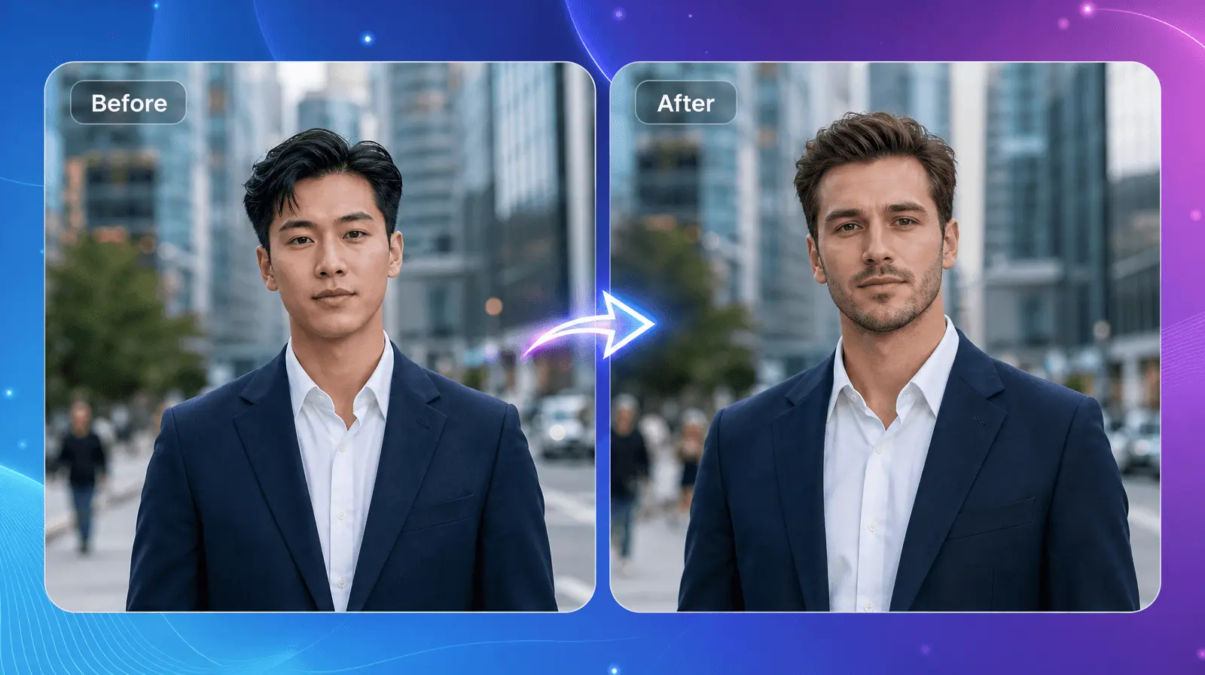
Face-swapping and lip-syncing used to be the kind of visual effects work that required a studio, a VFX team, and weeks of rendering time. In 2026, the same results — a character mouthing new dialogue in perfect sync, or a face convincingly swapped into a completely different scene — can be produced in a browser tab in under a minute. That shift has turned AI video tools into everyday equipment for marketers, creators, filmmakers, and social media teams.
But “AI video tools” has become a crowded category, and not every platform that promises realistic results actually delivers them. Some tools nail lip sync but fumble face swaps. Others produce great single images but choke on motion, occlusion, or longer clips. To save you the trial-and-error, we tested and researched the platforms creators are actually using in 2026, and ranked them on realism, speed, pricing transparency, and how well they hold up outside of perfect lighting conditions.
At a Glance
| Tool | Best For | Starting Price | Standout Feature |
| Magic Hour | All-in-one face swap + lip sync workflows | Free, then paid plans from $12/mo | No-signup trial, credits that never expire |
| Sync Labs | Studio-grade lip sync quality | Free tier + $5/mo, usage-based | Diffusion model built by the original Wav2Lip authors |
| HeyGen | AI avatars for marketing video | Free, then $29/mo | 40+ languages with voice cloning |
| DeepSwap | Quick, casual face swaps | Free trial, then $9.99/mo | Multi-face swapping (up to 6 faces) |
| Vidnoz | Budget social content | Free daily credits, then $20/mo | Generous daily free credit allowance |
| Wav2Lip | Developers who want to self-host | Free (open source) | No subscription, runs on your own GPU |
Magic Hour pricing: Free · Creator: $19/month or $12/month billed annually · Pro: $39/month or $25/month billed annually
How We Chose These Tools
We evaluated each platform against the same checklist rather than just skimming marketing pages:
- Output realism — how well the tool handles motion, side profiles, occlusion (hands, hair, glasses), and inconsistent lighting, since these are where most face swap and lip sync tools break down.
- Pricing transparency — whether the advertised price is what you actually pay once credits, resolution limits, and video length caps are factored in.
- Breadth of workflow — whether the tool is a one-trick feature or part of a fuller content pipeline (generation, upscaling, exporting to video).
- Speed and reliability at scale — how the tool performs under real production conditions, not just a single demo clip.
- Accessibility — free tier generosity, mobile support, and whether you need to hand over a credit card just to test the product.
1. Magic Hour — Best Overall
Magic Hour tops this list because it treats lip sync AI and AI face swap as core features rather than side experiments bolted onto a broader video suite. You can try both without creating an account, which matters when you just want to see whether the output quality holds up before committing to a plan. What sets it apart from single-purpose competitors is that it doesn’t stop at the swap or the sync — you can chain a generation straight into upscaling and then into a finished video in one workflow, instead of exporting and re-uploading between separate tools.
Key differentiators:
- Best-in-class face swap, lip sync, and talking photo quality
- No signup required to try the tools
- Credits never expire, unlike most competitors’ monthly-reset systems
- Access to frontier AI models under one roof, instead of juggling several subscriptions
- Click-to-create templates and one-click multi-step workflows (generate → upscale → video)
- Fast variations so you can generate multiple takes without starting over
- Weekly feature releases and parallel generations with no concurrency cap
- Optimized for both desktop and mobile, with founder-level support and reliable performance during traffic spikes
- Full API parity, so anything you can do in the app is available programmatically
Pricing:
- Free
- Creator: $19/month or $12/month billed annually
- Pro: $39/month or $25/month billed annually
Drawbacks: Because Magic Hour ships new features weekly, the interface occasionally reorganizes, which means returning users may need a minute to find a tool that moved. It’s also a generalist platform, so users who want a single-purpose, ultra-minimal face swap app with nothing else attached may find the broader toolset unnecessary for their use case.
2. Sync Labs — Best for Lip Sync Quality Alone
Founded by the original creators of Wav2Lip, Sync Labs is built almost entirely around one job: matching mouth movement to audio with studio-level precision, including fine details like teeth and micro-expressions.
Main features: 4K output, zero-shot syncing on any speaker, an API with Python and TypeScript SDKs, and support for occlusions and multiple faces in a single frame.
Pricing: Usage-based, starting around $5/month plus per-second charges (roughly $0.04–$0.13 per second depending on the model).
Drawbacks: It’s a pure lip sync engine, not a dubbing or translation tool, so you need translated audio from elsewhere. Per-second pricing can also add up quickly on longer videos, and its data policy allows uploads to be used for model training.
3. HeyGen — Best for AI Avatar Videos
HeyGen leans into corporate and marketing use cases, generating avatar-led videos with lip-synced narration in dozens of languages.
Main features: Custom video avatars, voice cloning, 1080p–4K export depending on tier, and translation tools for localized content.
Pricing: Free plan available; Creator starts at $29/month; higher tiers scale toward $149/month for team features.
Drawbacks: The credit system is where costs creep — premium avatar generation burns through credits far faster than the headline price suggests, and heavy users often end up paying well above the sticker price.
4. DeepSwap — Best for Casual Face Swaps
DeepSwap is a straightforward face-swap specialist, capable of replacing up to six faces in a single clip with 4K output.
Main features: Multi-face swapping, GIF maker, fast processing, and a claimed 90%+ similarity accuracy on well-lit source footage.
Pricing: Standard around $9.99/month; Pro around $19.99/month, both credit-based.
Drawbacks: No API access, meaning teams can’t build it into automated workflows. It also retains uploaded content on its servers for seven days, and quality drops noticeably on low-light or motion-heavy footage.
5. Vidnoz — Best Budget Option
Vidnoz is aimed at high-volume, low-budget social content, offering a mix of lip sync, avatars, and basic text-to-video tools.
Main features: A generous daily free-credit allowance, simple template-driven editing, and quick turnaround for short clips.
Pricing: Free daily credits; paid plans start around $20/month.
Drawbacks: Voice cloning and language support are noticeably more limited than premium competitors, and output quality trails behind higher-end tools on close-up or high-motion shots.
6. Wav2Lip — Best Free, Self-Hosted Option
Wav2Lip remains the open-source benchmark for lip sync, popular with developers who want full control and no subscription cost.
Main features: Free and self-hosted, modest GPU requirements (around 8GB VRAM), and a mature, well-documented codebase.
Pricing: Free — you only pay for your own compute.
Drawbacks: Requires technical setup and a GPU. Output shows visible artifacts on non-frontal angles, and the underlying architecture is dated compared to newer diffusion-based models.
FAQs
Is it legal to use AI face swap or lip sync tools? Using these tools on your own content, or with the clear consent of the people involved, is legal in most jurisdictions. Creating deepfakes of real people without their consent can violate privacy or defamation laws depending on where you live, so always get proper rights and disclose AI-generated content when it’s shared publicly.
Do free plans actually produce usable results? It depends on the platform. Some free tiers add visible watermarks or cap resolution, while others — like Magic Hour’s — let you generate real, usable output before you ever enter payment details.
What’s the difference between face swap and lip sync? Face swap replaces one person’s face with another’s across an image or video. Lip sync keeps the original face but resynchronizes the mouth movements to match new or translated audio. Many modern platforms, including Magic Hour, support both.
Can these tools handle longer videos? Most subscription tiers cap video length, and processing time increases with resolution and duration. If you’re working with long-form content, check a tool’s per-plan duration limits before committing.
Do I need technical skills to use these tools? No — most platforms on this list, aside from open-source options like Wav2Lip, are designed for a general audience with drag-and-drop uploads and template-based workflows.
Conclusion
The AI face swap and lip sync space has matured fast, and the gap between “impressive demo” and “reliable daily tool” is where most platforms fall short. Magic Hour stands out in 2026 because it doesn’t force a trade-off between quality, price, and flexibility — you get a genuinely capable AI face swap and lip sync AI toolkit, a free tier that doesn’t feel like a bait-and-switch, and a workflow that scales from a quick social clip to a full production pipeline. Whichever tool you choose, test it on your actual footage before committing to a paid plan — realism varies far more between tools than any spec sheet suggests.
Stay in touch to get more updates & news on See Blog Hub!